The Gadget's Blog

The Gadget's Blog
Showing posts with label Apple. Show all posts

Saturday, May 21, 2011

Retooled Google Maps For Mobile: Looks Good, Does Little


Retooled Google Maps For Mobile: Looks Good, Does Little


MacStories’ Federico Viticci is all over Google’s just-announced update to Maps for mobile browsers. The new version looks great and offers a more robust menu than its previous iteration. Says the misspelled big number:
Now, when you visit maps.google.com on your phone or tablet’s browser and opt-in to share your location, you can use many of the same Google Maps features you’re used to from the desktop.
For the curious, these features allow the user to:
  • See your current location
  • Search for what’s nearby with suggest and auto complete
  • Have clickable icons of popular businesses and transit stations
  • Get driving, transit, biking, and walking directions
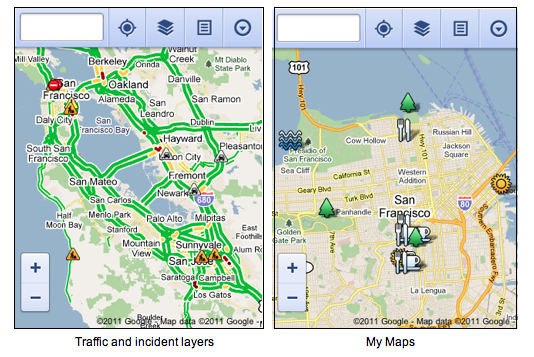
  • Turn on satellite, transit, traffic, biking, and other layers
  • View Place pages with photos, ratings, hours, and more
  • Access your starred locations and My Maps when signed into your Google account
iPhone users, take note: You’ve got to access all this via your mobile browser, as these changes do not apply to Apple’s stock Google Maps app. However, using Safari’s “Add to Home Screen” option, you’ll get an attractive little launch icon, and the visual experience looks somewhat in line with Apple’s design aesthetics.
iPhone Maps app logo vs. Google Maps web app logo.
The standard Safari toolbar would be right across the bottom.
Your mobile browser will have its standard toolbars in place.
Unfortunately, aside from the the social aspects on board (like photographs of supported businesses and stores, etc.), there seems little reason to use this over Apple’s prepackaged solution. For me, the latter’s load times were less than half of the browser-based version’s, and there is noticeable lag in accessing the web app menus. Additionally, Street View seems nowhere to be found on Google’s new build, and that — to me and many others — is one of the most useful things about using Maps on a mobile device.

Friday, May 20, 2011

Get Unlimited Storage And Unlimited Access Right On Your iDevice (By AppAdvice)


Wouldn’t it be great if you could have unlimited storage on your iDevice and access it from anywhere? Well with the help of some hardware and software this dream can become a reality.

Thursday, May 19, 2011

Comcast brings Xfinity TV VOD to iPhone, iPod Touch, but only on WiFi


 Comcast rolled out a v1.5 update today for the iPhone / iPod Touch versions of its Xfinity TV app which allows them to access the video on-demand streaming that has been available on the iPad since February. Just like the iPad however, they'll only work over WiFi -- no streaming over 3G or downloading for offline viewing here, although unlike Cablevision and Time Warner's iPad apps, you don't have to be on your own WiFi for it to work. The slate of content has expanded to include 25 networks and over 6,000 hours of video, so for those confusing times when you're within reach of WiFi but can't get close to a TV, you can still queue up something for viewing. The official Twitter account advises a delete / reinstall for those having issues since upgrading, if you're a Comcast subscriber who hasn't already snagged the free app for its channel changing and remote DVR scheduling capabilities, you can do so at the link below.
source  iTunes