The Gadget's Blog

The Gadget's Blog
Showing posts with label Cell Phone. Show all posts

Tuesday, May 24, 2011

New Droid 3 Specs Confirm 5-Row QWERTY, 4-inch qHD Display


Additional details for the Motorola Droid 3 have surfaced online, indicating a nice all-around bump is in store for Verizon's iconic handset.  The touch screen has been rumored to be a 4-inch qHD  display, bigger and higher resolution than its predecessors.  This has been confirmed by a TechnoBuffalo source who also adds that Motorola has indeed managed to squeeze a fifth row into the keyboard, providing a dedicated number row.
Additional details for the Droid 3 include an 8-megapixel camera on the back with a front-facing camera for video chat. Resolution is unknown at this time, but we're hoping for something around 2.0-megapixels.  One notably absent feature is the lack of 4G LTE support, something which Verizon is really pushing as of late. Maybe that's something more appropriate for a Droid 4. Droid 4G. See what we did there?
The processor is expected to be a dual-core platform, however the exact brand and type is not yet known. Some are hearing NVIDIA Tegra 2, but it's entirely possible that Motorola could stick with their friends at Texas Instruments, using the OMAP chipset.

Saturday, May 21, 2011

Retooled Google Maps For Mobile: Looks Good, Does Little


Retooled Google Maps For Mobile: Looks Good, Does Little


MacStories’ Federico Viticci is all over Google’s just-announced update to Maps for mobile browsers. The new version looks great and offers a more robust menu than its previous iteration. Says the misspelled big number:
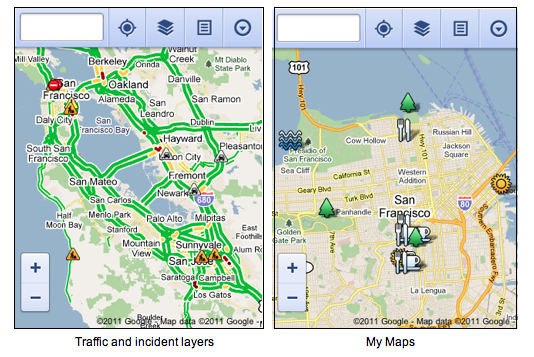
Now, when you visit maps.google.com on your phone or tablet’s browser and opt-in to share your location, you can use many of the same Google Maps features you’re used to from the desktop.
For the curious, these features allow the user to:
  • See your current location
  • Search for what’s nearby with suggest and auto complete
  • Have clickable icons of popular businesses and transit stations
  • Get driving, transit, biking, and walking directions
  • Turn on satellite, transit, traffic, biking, and other layers
  • View Place pages with photos, ratings, hours, and more
  • Access your starred locations and My Maps when signed into your Google account
iPhone users, take note: You’ve got to access all this via your mobile browser, as these changes do not apply to Apple’s stock Google Maps app. However, using Safari’s “Add to Home Screen” option, you’ll get an attractive little launch icon, and the visual experience looks somewhat in line with Apple’s design aesthetics.
iPhone Maps app logo vs. Google Maps web app logo.
The standard Safari toolbar would be right across the bottom.
Your mobile browser will have its standard toolbars in place.
Unfortunately, aside from the the social aspects on board (like photographs of supported businesses and stores, etc.), there seems little reason to use this over Apple’s prepackaged solution. For me, the latter’s load times were less than half of the browser-based version’s, and there is noticeable lag in accessing the web app menus. Additionally, Street View seems nowhere to be found on Google’s new build, and that — to me and many others — is one of the most useful things about using Maps on a mobile device.

Samsung Omnia 7 patch resistance resolved using, well... resistors of course (video) (By Engadget Mobile)


Omnia 7 owners just can't get a break. Sure, life seemed dandy after Samsung released a utility that promised to resolve future update headaches, but that assumed everyone would be able to apply the fix. Unfortunately, Sammy's tool requires users to put their phone into download mode to get the patch -- a feat that devices with bootloader v4.10.1.9 simply cannot perform. Understandably, some frustrated folks are taking matters into their own hands after discovering a way to fool the Omnia 7's circuitry, which forces the phone to enter download mode with the help of a 301KOhm resistor (although three 100KOhm resistors in series work fine most of the time). It's not a pretty solution, but seems to be working for many. Hit the break for a video detailing the trickery -- RadioShack will surely appreciate the business.
VIDEO:

Friday, May 20, 2011

Nokia's Windows Phones will feature dual-core ST-Ericsson U8500, says STMicroelectronics chief


As you'll no doubt be aware, Qualcomm currently enjoys a stranglehold on processing hardware insideWindows Phone handsets. Its Snapdragon chip stars in both Microsoft's original and updated chassis spec for the platform, but its hegemony may soon be coming to an end. STMicroelectronics (the ST in ST-Ericsson) boss Carlo Bozotti is cited by Forbes as saying that Nokia will use ST-Ericsson hardware to power at least some of its Windows Phones. The dual-core U8500, a long-time Nokia favorite, is touted as the first such system-on-chip to appear, with its successors helping to populate Nokia's expansive WP lineup in 2012. The only intel we've had so far on Nokia's initial handsets for the new OS revolved around Qualcomm-based devices, so even if ST-Ericsson is indeed going to infiltrate the Windows Phone ecosystem, it doesn't look likely to be among the very first Nokias out of the gate

Thursday, March 17, 2011

18 Battery tips and tricks for longer battery life (Android)


If you’re new to owning a smartphone the biggest thing you’ll have to get used to is how often you’ll have to charge your phone. Especially if you’re coming from a phone that was, well, just a phone; it’ll be a big change from charging your phone once  every other week to once every other day. So here are some tips that can help you max at your battery life.
If you try and do all of these it may ruin your Android experience because you’ll be constantly finicking with your battery; thats not what this is for. These are ALL the tips/tricks I know. Even I don’t use all of them. Using just a few of these (possibly even one or two) should be enough that you notice an increase in your battery life.
FOR ALL USERS
1. Turn off of your radios when not using them
Radios are what connect your phone to the rest of the world. You have your general mobile connection, wifi, data/internet connection (3G), GPS, and/or 4G. Those are listed in order from least to greatest in battery consumption. If you’re not using the radio turn it off. If you know you won’t be online for a long time, why turn 3G data on? If you’re at home, use wifi instead of 3G. If you’re not using Google Maps why is your GPS on? You’d be amazed at how much battery life you can save just by turning off the radios that you aren’t using. There are plenty of widgets in the market that will allow you to turn off the radios without even going through settings (Sense users have these widgets packaged in).
2. Vibrate uses more battery
Anytime your phone vibrates a lot of battery is used. This include haptic feedback. A lot of keyboards have the option to turn off haptic feedback and I would recommend it. If you’re a heavy texter you’ll notice very quickly how much longer your phone will last. Also, if you’re in a place where you can easily hear your phone why do you need to have vibrate enabled? If you know you’ll be able to hear your phone there’s no reason for it to be buzzing too.
3. Don’t use task killers
Crazy, right? Especially if you’re on Froyo (Android 2.2) or higher, Android has it’s own task killer that’s actually very good. If programs are using too much memory your Android OS will kill it. A common misconception is that apps run in the background forever; this is not true. If an app is using too much memory (which links to battery life) it’ll be killed by your phone. That’s why if you play a game, check a message, and come back the game is still running. It’s memory usage isn’t that high. However if you put your phone down, walk away for an hour, and the game is still trying to run in the background, there’s a good chance it will be closed before you come back. Separate task managers have to constantly be running in the background which can actually use more battery than it saves. Yes, task managers can use more battery than they save.
4. Do this shenanigans
Originally posted by kthejoker20, this trick came from HTC themselves and can seriously DOUBLE your battery life.
With the phone in the on position.
Fully charge the battery with the phone on… (until the led turns green.)
Once the led turns green, unplug the charger until the led goes off.
After the led goes off, plug the charger back in. When the led turns green , power off the phone.
now…. with the phone fully powered off…
1. Unplug the charger.
2. Wait until led goes off.
3. Plug charger back in until the led turns green. When it turns green, unplug the charger again and go to step 1.
4. repeat steps 1 and 3, 10 times. This may take anywhere from 30 seconds to 30 mins per cycle. Typically only about 1 minute. though.
It takes too much work for me, but I’ve done it once just to test it. It works.
5. Juicedefender
A lovely free app (there’s an extended version called UltimateJuice) that helps your phone save battery. You have to see it to understand it, but anyone who is serious about saving battery needs this app.
6. Don’t use live wallpapers
They look awesome, right? They also use a lot of battery (especially the more complex ones). We’ve all used live wallpapers to show off how cool our phones can be, but for daily use they can KILL your battery.
7. Set your screen timeout to something shorter
Some phones start with their screen timeout at 3 minutes or more. That’s completely unnecessary. While you don’t want it to be instant, you know your preferences. Set it to as low as you see fit. The sooner your screen goes off, the longer your battery life will last.
8. Kill tasks you aren’t using
Not the same as an automated task killer. Find an app in the market that can kill programs MANUALLY. People running AOSP Devices (Android Open Source Project…aka your phone is pure Google and not HTC Sense or some other skin) have the benefit of being able to hold the back button to kill apps.
9. Your camera flash and battery don’t get along
If you like using your camera LED for a flashlight realize that will absolutely MURDER your battery. In all seriousness, your flash uses battery more than any other process on your phone.
10. Low cell signal hurts battery
Your phone is always searching for a stronger signal…This process gets more hectic as the cell signal goes down. So if you’re at one bar your phone’s battery life will drop faster than if you’ve got full coverage. There’s not much you can do here, but if you’re in a place where your phone has little to no signal anyway, you probably won’t be making calls so you might want to just turn on airplane mode or your phone off.
11. Turn off always on mobile data
I know on my Evo the setting is hidden under menu>settings>wireless & networks>mobile networks>disable always on mobile data. What this will do is turn off your internet/data when you’re not using it (specifically after your phone’s been asleep for 5 minutes). It will turn back on shortly if you have a new email or need to sync something.
12. Speaking of syncing…
Check your settings to see what is syncing and when. You probably have things syncing you don’t even use (stocks, news, contacts, etc). You can turn those off and edit the other ones. I don’t need my contacts’ statuses every hour, so my facebook sync is scheduled for once a day rather than the old once an hour. However, I like my weather being up to date so it’s synced every half hour. Find out what you need and how often you want it, and turn the rest off.
13. Don’t use GPS unless you have to
Some apps give you the option to precisely determine your position using GPS, or make a general estimate (usually within 100 meters) based on wifi or 3G data. While this isn’t always the best (like if you’re driving or getting navigated), try to use the 3G connection when it doesn’t really matter. The data radio uses far less battery than GPS.
FOR ROOT USERS
If you’ve rooted your phone you have a few more options. You don’t gain too many more options, but they are even more effective than the ones listed above.
14. Trickle charging kernels
Try and get kernels that use trickle charging. These will really ramp up your battery life.
15. Find out if your phone likes HAVS
Basically, try undervolting kernels and see if your phone likes them. If it does, use them. They change the voltage your phone uses based on your activities and how much battery life you have left.
16. If it doesn’t…
Use the Collin_ph Battery Tweak. That one is specific for the Evo, however there are other builds for other devices. I personally use this and can testify that it works WONDERS.
17. Underclock your phone
Just like SetCPU can overclock your phone, it can underclock it as well. Set it to underclock when the phone is sleeping or even lower the max clocking speed.
18. Try different kernels
Just because he/she said that it works for their phone doesn’t mean it will work for yours. Every phone handles kernels differently. Trying some of them (GIVE THEM A DAY OR TWO TO SET IN) can give you a perfect experience of performance and battery.
Try using these tricks and your battery life will never be better!

Tuesday, March 15, 2011

VZW Confirms March 17th As HTC Thunderbolt Launch Date


Looks like we finally have a launch date for the HTC Thunderbolt, branded by Verizon. So St Patricks day we can wear our green shirts, and pinch ourselves to make sure we’re not dreaming when we see the long awaitied Thunderbolt on display at the nearest Verizon Wireless retailer.
This phone has been highly anticipated since announced at CES 2011. This is Verizon’s first LTE device, and will be powered by Android-2.2, with 1GHz Snapdragon processor, 8GB onboard memory, 4.3” WVGA display, 8-megapixel rear facing camera.
Take note of the past few tweets this morning from @VerizonWireless.
So get out there, get your hands on the new Thunderbolt! Press Release after the break:
BASKING RIDGE, NJ — Verizon Wireless and HTC today announced that the ThunderBolt by HTC, exclusively from Verizon Wireless, is available on March 17 in Verizon Wireless Communications Stores and online at www.verizonwireless.com for $249.99 with a new two-year customer agreement.
Powered by Android™ 2.2, the ThunderBolt by HTC is the first smartphone to take advantage of Verizon Wireless’ 4G LTE network. The ThunderBolt by HTC features the latest version of the HTC Sense™ experience, which offers enhancements including new personalization options, a consolidated e-mail inbox, and unique camera effects and filters. The ThunderBolt by HTC is equipped with support for Google Mobile Services, including Gmail™, YouTube™ and Android Market™ with thousands of free apps. Additionally, the ThunderBolt by HTC will feature 4G LTE optimized apps such as EA’s Rock Band, Gameloft’s Let’s Golf, Tunewiki and Bitbop.
Additional features:
  • 4G LTE – customers can expect download speeds of 5 to 12 Mbps and upload speeds of 2 to 5 Mbps in 4G Mobile Broadband coverage area
  • 4.3” WVGA display
  • 8-megapixel rear facing camera and HD (720p) video recording
  • 1.3-megapixel front facing camera with video chatting capabilities
  • Newest generation of the 1GHz Snapdragon processor
  • Mobile Hotspot capability – share 4G connection with up to eight Wi-Fi-enabled devices
  • 8 GB of onboard memory and a pre-installed 32 GB microSD card (Actual formatted capacity will be less)
  • Built-in kickstand for easy media viewing
With the ThunderBolt by HTC, customers will need to subscribe to a Verizon Wireless Nationwide Talk plan and a 4G LTE data package. Nationwide Talk plans begin at $39.99 monthly access and an unlimited 4G LTE data plan start is $29.99 monthly access. Mobile Hotspot allows users to connect up to eight Wi-Fi-enabled devices to the nation’s fastest wireless network via an application available on the ThunderBolt by HTC.
Mobile Hotspot will be included through May 15 for no additional charge. After May 15, customers may choose to activate Mobile Hotspot for $20 for 2 GB of data per month. Customers can track their data usage by downloading the My Verizon app available in Android Market or by logging on to their My Verizon accounts online at www.verizonwireless.com/myverizon

Motorola Droid 3, Droid X 2 and LTE-equipped Targa pictured?


The Motorola Droid 2 and Droid X are both headed toward their one-year anniversaries this summer, which has pretty much become the culling hour for a smartphone of any creed these days. Their successors, ingeniously titled the Droid 3 and Droid X 2, have seemingly made an appearance over atHowardForums, courtesy of longtime forum member wnrussell. He's also kindly provided imagery of a heretofore unknown device, called the Targa, which promises Verizon 4G LTE and has a protrusion on its rear that looks to be dedicated to accommodating an outsized camera sensor. It reminds us most of Motorola's XT720, though it sports a chrome outline to its body similar to what you see above on the purported Droid 3.


Monday, March 14, 2011

Xperia Play 'Donor' ad shows how Android got its thumbs


Thumbs!


If you've watched the creepy Xperia Play "Android thumbs ad" and wondered about the backstory of the thumbs in question, then you'll be relieved to hear that Sony Ericsson has provided you with the answers you crave in a brand new commercial.
The ad, entitled "The Donor", tells the chilling story of a man brutally robbed of his opposable digits by Sony Ericsson just so you can play Tekken on your phone. Check it out for yourself after the jump. The Xperia Play is due out in Europe later this month.


iPhone 5 won't have NFC, say insiders at UK carriers


The Independent is starting our week off on a sour note with the information that Apple's next iPhone won't have NFC hardware built in. Near Field Communication has found itself coming to the fore this year, thanks in large part to the Nexus S touting it as a major feature, however sources at "several" of the UK's major carriers have told the newspaper that Apple intends to skip on it for this year. That intel is reportedly coming directly from meetings with the Cupertino brain trust, which is said to be dissatisfied with the current lack of a clear, universal NFC standard. It's generally been Apple's wont to omit or delay features it doesn't feel it can implement well, and NFC looks fated to be another one on that list.

Sunday, March 13, 2011

Hulu for Android coming soon, destined for 'select' phones with Android 2.2?


Since the dawn of Flash on Android -- yes, that was just ten months ago -- Google smartphone users been largely unable to access their favorite Hulu programs on the go. At CES 2011, we heard that Hulu would indeed come to Android, but not when or where. Today, we're a step closer to the answer. An eagle-eyed Engadget reader spotted this image at the company's website, depicting a most unusual combo: an image of a Samsung Nexus S (which comes with Android 2.3) and a suggestion that Hulu Plus will soon be available on a subset of devices running Android 2.2. We can't say which devices quite yet, but we've heard this tune before, and suspect Hulu will only run on phones that have DRM baked into their hardware. Now how about that Google TV?

Saturday, March 12, 2011

First look at the HTC Thunderbolt


We've seen a number of leaks of the HTC Thunderbolt leading up to CES 2011. But to hold the Verizon 4G LTE phone in your hand certainly is electric. <Ducks!> Seriously, though. HTC knows how to make smartphones. Verizon knows how to serve up the high-speed data. And combine them in this 4.3-inch, 1GHz Sense device (and the new Sense, too!), and we've got one powerful beast.
You get Wireless hotspot. You get the Skype video chat. You get games. You get Android 2.2 with a promise to upgrade to Android 2.3.

HTC Thunderbolt Video:


Friday, March 11, 2011

HTC says Thunderbolt will be announced 'soon'

HTC Thunderbolt


HTC threw out a piece of HTC Thunderbolt news, to let us all know another piece of HTC Thunderbolt news is coming "soon".  On their Facebook page, they have this to say:
There is a lot of excitement about the first Verizon LTE device, the HTC ThunderBolt. HTC and Verizon will officially and publicly announce the Thunderbolt launch dates soon. Please stay tuned for the debut of this great new device.
So yeah, it is just a nice way of letting us know there's more waiting to be done. Stay updated for more Thunderbolt news!

FCC approves Kyocera Echo, BlackBerry PlayBook


Just like it did last week the Federal Communications Commission gave the nod to a lot of new cell phones and tablets this week. Among the highlights were Sprint's quirky new Kyocera Echo, the LG Revolution and the RIM BlackBerry PlayBook.
Because the FCC has to certify every phone sold in the United States, not to mention test its SAR rating, the agency's online database offers a lot of sneak peeks to those who dig. And to save you the trouble, Crave has combed through the database for you. Here are a selection of filings from the past week on new and upcoming cell phones. Click through to read the full report.

Thursday, March 10, 2011

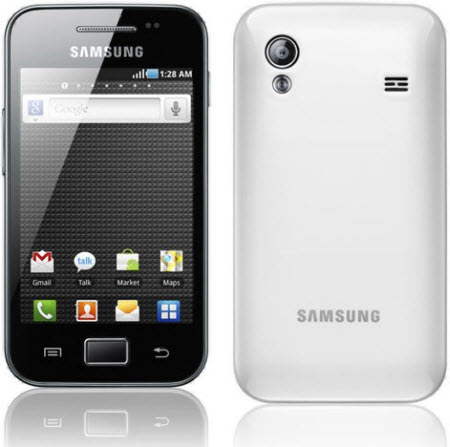
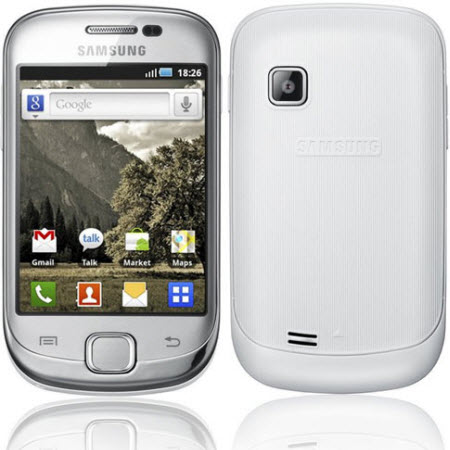
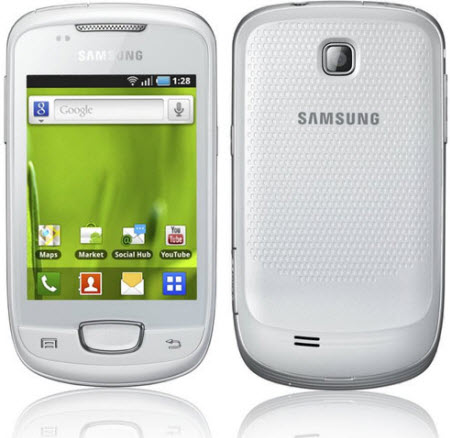
Samsung Officially Launches Galaxy Ace, Fit And Pop For India


Samsung Galaxy Ace:

  • 3.5 inch TFT capacitive touchscreen display
  • 320 x 480 pixels resolution
  • 800 MHz ARM 11 processor
  • Android 2.2 (Froyo) OS
  • 3G connectivity
  • Wi-Fi 802.11 b/g/n
  • 5 megapixel camera with autofocus and LED flash
  • 158 MB internal memory
  • 32 GB expandable memory
  • Stereo FM radio with RDS
  • 3.5 mm audio jack
  • Bluetooth v2.1 with A2DP
  • DLNA
  • A-GPS
  • 1350 mAh battery


Samsung Galaxy Fit:

  • 3.31 inch QVGA display
  • 240 x 320 pixels resolution
  • 600 MHz processor
  • Android 2.2 (Froyo) OS
  • 3G connectivity
  • Wi-Fi 802.11 b/g/n
  • 5 megapixel camera with autofocus
  • 160 MB internal memory
  • 32 GB expandable memory
  • Stereo FM radio with RDS
  • 3.5 mm audio jack
  • Bluetooth v2.1 with A2DP
  • A-GPS
  • 1350 mAh battery

Samsung Galaxy Pop:

  • 3.14 inch QVGA display
  • 320 x 480 pixels resolution
  • 600MHz processor
  • Android 2.2 (Froyo) OS
  • 3G connectivity
  • Wi-Fi 802.11 b/g/n
  • 3 megapixel camera
  • MicroSD card slot
  • 32 GB expandable memory
  • Stereo FM radio with RDS
  • 3.5 mm audio jack
  • Bluetooth v2.1 with A2DP
  • DLNA
  • A-GPS
  • 1200 mAh battery
Samsung Galaxy Ace, Galaxy Fit and Galaxy Pop is priced at Rs.18,290, Rs.12,860 and Rs.11,198 respectively.